
Dies ist eine alte Version des Dokuments!
Inhaltsverzeichnis
GRNbms MK3 Quick Start Guide
1. Power Supply
The GRNbms MK3 supports both High Voltage (HV) and Low Voltage (LV) operation.
➤ Low Voltage Mode (12 V System)

- Connect 12 V to the „Jump Start“ connector
- This powers the BMS directly for low-voltage applications or setup/configuration
➤ High Voltage Mode
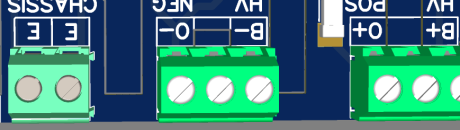
- For high-voltage setups, connect the BMS using the dedicated HV connectors
HV POS Connector:
B+→ Connect directly to Battery PositiveO+→ Output (post-relay) – not required for power supply
HV NEG Connector:
B-→ Connect directly to Battery NegativeO-→ Output (post-relay) – not required for power supply
✅ To power the BMS: only B+ and B- are needed
⚠️ Valid voltage range: 150 V – 1200 V DC Operating the BMS outside this range may cause malfunction or damage.
Additionally, for safety and EMI compliance:
- Connect the battery chassis to the
Epin on the CHASSIS connector - Use a dual connection if possible for redundancy
👉 Details about relay and output wiring can be found here
2. Network Connection
An internet connection is required for the initial setup and activation of your BMS.
📝 Note:  A GRNbms.de account is required to complete the setup.


You can create one during the initial configuration or in advance here.
➤ Ethernet Connection (recommended)
- Connect the BMS (ETHERNET 1 Connector) to your local network using a standard RJ45 Ethernet cable
- The BMS will automatically obtain an IP address via DHCP (from your router)
➤ WLAN (optional)
If no Ethernet is available, the BMS can create a WiFi access point:
- Plug in a compatible USB WiFi stickbefore power-on
✅ Must be a supported chip – see compatible WiFi sticks list
The BMS will create a hotspot:
- SSID:
GRNbms_MK3_AP - Password:
0123456789 - IP Address:
192.168.4.1
Connect to the hotspot and open http://192.168.4.1to start setup.
➤ Accessing the BMS
Once connected, try opening one of the following in your browser:
💡 These names work only if your router supports mDNS or local hostname resolution.
➤ Can’t find your BMS?
No problem – just visit grnbms.de
There you can see all BMS devices in your local network.